Setting up CORS
What is CORS?
Cross-origin resource sharing (CORS) is a browser mechanism which enables controlled access to resources located outside of a given domain. It extends and adds flexibility to the same-origin policy (SOP), which limits the ability for a website to interact with resources outside of the source domain. The same-origin policy was defined many years ago in response to potentially malicious cross-domain interactions, such as one website stealing private data from another
CORS is based on HTTP headers and allows a server to specify which origins (domain, scheme, or port) other than its own can be used by a browser to send requests. CORS also relies on a mechanism by which browsers make a "preflight" request to the server hosting the cross-origin resource, in order to check that the server will permit the actual request. In that preflight, the browser sends headers that indicate the HTTP method and headers that will be used in the actual request.
To enable sending API requests from a browser to Mediagenix base platform, since version 2020r1.001, CORS headers can be configured on REST services, including the business API interface service.
Configuration
In the Security tab of the service configuration navigator for the service, a CORS REPONSE HEADERS list is available.
When the list is empty, a browser will not be able to send any requests to the BAPI service.
When an item is added to the list, the following properties can be edited:
-
Allowed origin: This is mandatory. Type the HTTP address that should be allowed as origin. For example, http://myapi-interface.com. If any origin is allowed, the wildcard * can be defined.
-
Allow GET: By default, this is set to Yes for a new item, meaning that GET requests from this origin are allowed.
-
Allow POST/PUT/DELETE: By default, this is set to No for a new item, meaning POST, PUT and DELETE requests will not be allowed. Select Yes if they should be allowed.
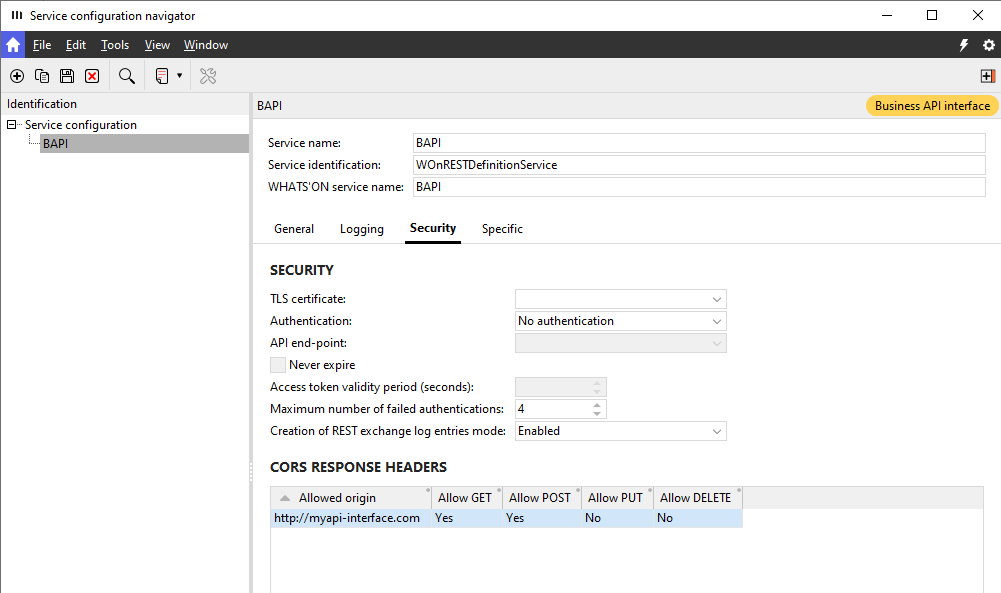
When the service is started and a request is sent from a browser, the browser will send a preflight request by means of an OPTIONS call. This call will include the origin the request was sent from, usually in an Origin header. If the call originates from an address defined in the Allowed origin column, Mediagenix Base platform will return the following headers in the response:
-
Access-Control-Allow-Origin: This will contain the address defined in the Allowed origin column. In the example screenshot, http://myapi-interface.com. -
Access-Control-Allow-Methods: This will contain the methods for which the Allow [method] column is set to Yes. In the example, this will be GET, POST.
An example of a response to an OPTIONS call sent by Postman:
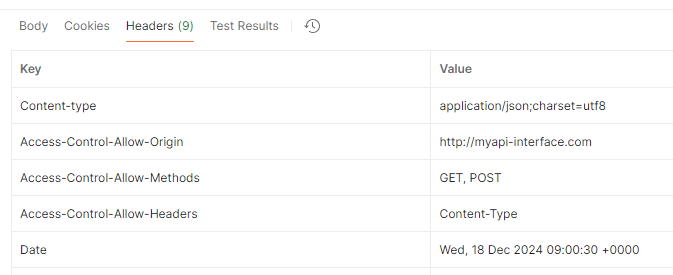
If the origin address is not included in the allowed origins of the list, the headers are not part of the response and the call will not be allowed.
If the headers are included and a call with an allowed method was sent, the call will be allowed. If the method was not part of the headers, the call will not be allowed.
If multiple allowed origins are defined in the list, the entire list is checked and the appropriate headers are returned for that origin address. For example:
| Allowed origin | Allow GET | Allow POST | Allow PUT | Allow DELETE |
|---|---|---|---|---|
| * | Yes | No | No | No |
| http://myapi-interface.com | Yes | Yes | Yes | No |
If the browser sends a call from http://ourotherapi-interface.com, the headers will be included in the reponse as this address falls under the wildcard * origin. If a GET call is sent, it will be allowed. If a POST call is sent, it will not be allowed.
If the browser sends a call from http://myapi-interface.com, the headers will be included in the reponse as the address matches the allowed origin of the second list item. If a GET, POST or PUT call is sent, it will be allowed. If a DELETE call is sent, it will not be allowed.
When a call is blocked in the browser, the error might look something like this:
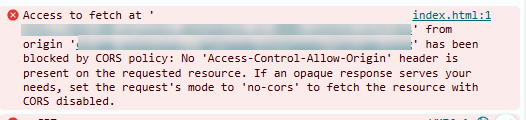
The origin address should then be added to the CORS REPONSE HEADERS list to solve the error.